Algo bars are an innovative feature that allows you to write your own alerts and signals, without coding, compiling, etc.
Below, you can see one set of example conditions for a signal
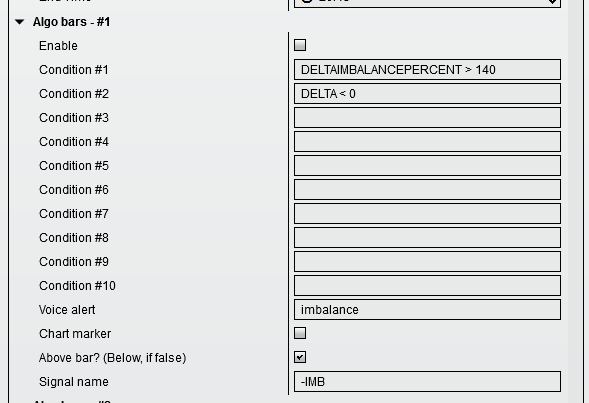
Enable
Globally enables or disables the signal.
The chart marker option places the text in the Signal name field onto the chart as a native NinjaTrader text object (for interaction with third-party tools), above or below the bar, as set in the options.
Condition #x
Conditions are the criteria you want to match for the signal to be generated. All signals must be true for the event to trigger.
Comparison conditions typically consist of 3 or more parts (depending on the comparison): a variable name or value, a comparison operator, and another variable name or value. There must be one or more spaces between each part. For example:
Comparison operators
The full list of supported comparison operators is: >, <, >=, <=, ==, !=, and ~~. The ~~ operator means “close enough” — it performs an approximate rather than exact match (within 20% of the right-hand value).
Logical operators
The && (AND) and || (OR) logical comparators are supported to combine multiple conditions. With &&, all joined conditions must be true. With ||, at least one of the joined conditions must be true.
Arithmetic operations
The ’26 release added support for simple arithmetic: +, -, *, and /. These follow standard order-of-operations rules (multiplication and division before addition and subtraction). For example, CLOSE > OPEN + 5 evaluates as CLOSE > (OPEN + 5).
Parentheses for evaluation order
Parentheses can be used to force a specific evaluation order or simply for clarity:
Important notes on expression parsing
The expression evaluator processes parenthesised sub-expressions before evaluating comparisons. Within parentheses, the content is evaluated as arithmetic (not a comparison). Outside parentheses, comparisons and logical operators work normally.
Mixed expressions caveat
The parser handles either pure arithmetic or pure comparisons within any given expression segment. An expression like CLOSE > OPEN - 100 may not evaluate as expected because the parser does not handle interleaved comparison and arithmetic operators in a single flat expression. To be safe, always use parentheses around each logical sub-expression:
Formula examples
Below are practical formula patterns you can copy directly into your conditions. Each example includes an explanation of what it detects.
Trend direction
CLOSE > OPEN
— Up bar — closes above open (bullish candle)
Down bar detection
CLOSE < OPEN
— Down bar — closes below open (bearish candle)
Strong body relative range
(CLOSE - OPEN) / (HIGH - LOW) > 0.8
— Bar body is more than 80% of total range (strong directional move, low wicks)
Close near high
CLOSE > HIGH * 0.995
— Closes within 0.5% of the bar high (near-top close = bullish strength)
Volume spike vs average
VOLUME > VOLUMEB0 * 3
— Current volume is more than 3x bucket-0 reference volume
Delta dominance
DELTA / VOLUME > 0.5
— Net delta exceeds half the bar’s total volume (aggressive one-sided flow)
Profile level breach — above VAH
CLOSE > SESSIONVAH
— Price closed above session Value Area High (breakout from value range)
Profile level breach — below VAL
CLOSE < SESSIONVAL
— Price closed below session Value Area Low (breakdown from value range)
Typical price vs VWAP
(HIGH + LOW + CLOSE) / 3 > VWAP
— Bar’s typical price above VWAP (bullish relative to fair value)
Wick rejection at high
CLOSE - OPEN < (HIGH - CLOSE) * 2
— Long upper wick on up bar — possible rejection of higher prices
Multiple condition with AND
(CLOSE > OPEN) && VOLUME > 500
— Up bar AND volume above 500 (both must be true for signal to fire)
OR logic — either side
(CLOSE > OPEN) || HASBULLISHSWEEP
— Either an up bar OR a bullish sweep occurred (one must be true)
Combined trend + volume confirmation
(CLOSE > OPEN) && VOLUME > DELTACUM * 0.1
— Up bar AND volume exceeds 10% of cumulative delta (trend with flow backing it)
Approximate match with ~~
CLOSE ~~ VWAPAVG
— Close is within ~20% of average VWAP (close enough to fair value zone)
Bar range expansion
(HIGH - LOW) > ((HIGH[1] + LOW[1]) / 2 - (LOW[1])) * 1.5
— Current bar’s high-low is larger than 1.5x previous typical range (expansion day)
Bracketing POC with volume filter
(CLOSE > VPOC || CLOSE < VPOC) && HASBULLISHALGOBARS == 0
— Price not at POC AND no bullish algo bar present — avoids false signals at equilibrium
Variable names — quick-scan list
A complete alphabetical reference below. Hover or click the categories at the end of this page for more detailed descriptions grouped by topic.
ALGOBARSCUSTOMVALUE1 — Custom value configurable via the AlgoBars UI
COTDELTAHIGH — Commitment of Traders delta high reference level
COTDELTALOW — Commitment of Traders delta low reference level
CLOSE — Current bar close price
DACLASSIFIERCUSTOMMATCH0 — Custom classifier match score (DA only)
DAEOC0 — Expected outcome current value
DAEOC1 — Smoothed expected outcome score
DAEOCF — Far-future expected outcome score
DAMARKETBIAS — Market bias from ML analysis (DA only)
DATRADEBIAS — Trade bias: 0 = neutral, positive/negative for directional lean (DA only)
DATRADEBIASCONFIDENCE — Confidence level of the trade bias prediction as a percentage, 0 to 100 (DA only)
DARRLONG — ML long classification score (DA only)
DARRSHORT — ML short classification score (DA only)
DELTAB0 — Delta for volume bucket 0 (requires bucketing enabled)
DELTAB1 — Delta for volume bucket 1 (requires bucketing enabled)
DELTAB2 — Delta for volume bucket 2 (requires bucketing enabled)
DELTAB3 — Delta for volume bucket 3 (requires bucketing enabled)
DELTAB4 — Delta for volume bucket 4 (requires bucketing enabled)
DELTACUM — Cumulative delta across multiple bars (if multibar mode is enabled, otherwise 0)
DELTADIVATHIGHLOW — Delta divergence detected at bar high or low
DELTAIMBALANCEPERCENT — Combined imbalance delta percentage
DELTA — Current bar delta
DELTAPERCENT — Delta as a percentage of total bar volume
DELTARANK — Delta rank percentile
DPOC — Delta at the bar’s POC (Point of Control)
DURATIONMS — Bar duration in milliseconds
DURATIONS — Bar duration in seconds
HASBEARISHABSORPTION — Bearish absorption detected on this bar
HASBEARISHALGOBARS — Bearish algo bar detected on this bar
HASBEARISHABOVEBELOWPOC — Above/below POC signal (bearish)
HASBEARISHDELTACHANGE — Delta change signal (bearish)
HASBEARISHDELTADIVATHIGHLOW — Delta divergence at bar high/low (bearish)
HASBEARISHDELTADIV — Bearish delta divergence detected on this bar
HASBEARISHENSDA — ENS DA signal (bearish, requires Data Analytics setup)
HASBEARISHFADINGDELTAMOMENTUM — Bearish fading delta momentum detected
HASBEARISHHIGHPROBABILITYDA — High probability DA setup (bearish, requires Data Analytics setup)
HASBEARISHMULTIPLEIMBALANCE — Multiple imbalance on the bearish side
HASBEARISHPORTFOLIO — Bearish portfolio signal detected (requires Data Analytics setup)
HASBEARISHPROFILEPATTERN — Original profile pattern sell signal
HASBEARISHRISINGDELTAMOMENTUM — Rising delta momentum (bearish)
HASBEARISHSTACKEDIMBALANCE — Stacked imbalance on the bearish side
HASBEARISHSWEEP — Bearish sweep detected on this bar
HASBEARISHVOLUMESEQUENCING — Bearish volume sequencing detected
HASBULLISHABSORPTION — Bullish absorption detected on this bar
HASBULLISHALGOBARS — Bullish algo bar detected on this bar
HASBULLISHABOVEBELOWPOC — Above/below POC signal (bullish)
HASBULLISHDELTACHANGE — Delta change signal (bullish)
HASBULLISHDELTADIVATHIGHLOW — Delta divergence at bar high/low (bullish)
HASBULLISHDELTADIV — Bullish delta divergence detected on this bar
HASBULLISHENSDA — ENS DA signal (bullish, requires Data Analytics setup)
HASBULLISHFADINGDELTAMOMENTUM — Bullish fading delta momentum detected
HASBULLISHHIGHPROBABILITYDA — High probability DA setup (bullish, requires Data Analytics setup)
HASBULLISHMULTIPLEIMBALANCE — Multiple imbalance on the bullish side
HASBULLISHPORTFOLIO — Bullish portfolio signal detected (requires Data Analytics setup)
HASBULLISHPROFILEPATTERN — Original profile pattern buy signal
HASBULLISHRISINGDELTAMOMENTUM — Rising delta momentum (bullish)
HASBULLISHSTACKEDIMBALANCE — Stacked imbalance on the bullish side
HASBULLISHSWEEP — Bullish sweep detected on this bar
HASBULLISHVOLUMESEQUENCING — Bullish volume sequencing detected
HASIMBALANCEDN — Downward imbalance present (returns 1 or 0)
HASIMBALANCEUP — Upward imbalance present (returns 1 or 0)
HIGH — Current bar high price
IMBALANCEDNPERCENT — Downward imbalance as a percentage of total volume
IMBALANCEDNVOLUME — Total downward imbalance volume on the bar
IMBALANCEUPPERCENT — Upward imbalance as a percentage of total volume
IMBALANCEUPVOLUME — Total upward imbalance volume on the bar
HASTRAPPEDSELLERS — Algo detected trapped sellers within the lookback period
HASTRAPPEDBUYERS — Algo detected trapped buyers within the lookback period
LOW — Current bar low price
MAXDELTAATPRICE — The maximum delta at any single price within this bar
OBV — On-Balance Volume for this bar (bar-level OBV minus its average)
OPEN — Current bar open price
SIGNALSUM — Sum of signals triggered on this bar. Bearish = -1, bullish = +1
TAILSIZE — Size of the bar tail in points (low wick on up-close bars, high wick on down-close bars)
TRMODE — Trend mode: 1 = trend, 0 = regression
TREND1 — Slope value from the trend indicator (requires enabled)
TREND2 — Second slope value from the trend indicator (requires enabled)
TREND3 — Third slope value from the trend indicator (requires enabled)
VAH — Bar’s Value Area High
VAL — Bar’s Value Area Low
VOLUME — Current bar volume
VOLUMEB0 — Volume for bucket 0 (requires bucketing enabled)
VOLUMEB1 — Volume for bucket 1 (requires bucketing enabled)
VOLUMEB2 — Volume for bucket 2 (requires bucketing enabled)
VOLUMEB3 — Volume for bucket 3 (requires bucketing enabled)
VOLUMEB4 — Volume for bucket 4 (requires bucketing enabled)
VPOC — Bar’s POC (Point of Control)
VWAP — Bar’s VWAP value
VWAPAVG — Average VWAP across bars
Variable names by category
For reference, variables are also grouped below. The quick-scan list above has everything in one place; the categories here provide optional additional context.
Price and Volume Data
CLOSE — Current bar close price HIGH — Current bar high price LOW — Current bar low price OPEN — Current bar open price VOLUME — Current bar volume VWAP — Bar’s VWAP value VWAPAVG — Average VWAP across bars
Delta and Order Flow
DELTA — Current bar delta DELTACUM — Cumulative delta across multiple bars (if multibar mode is enabled, otherwise 0) DELTAB0 through DELTAB4 — Delta values for each of the 5 volume buckets (requires bucketing to be enabled) DELTARANK — Delta rank percentile DELTAPERCENT — Delta as a percentage of total bar volume DELTAIMBALANCEPERCENT — Combined imbalance delta percentage
Volume Buckets
VOLUMEB0 through VOLUMEB4 — Volume for each of the 5 buckets (requires bucketing to be enabled) IMBALANCEUPVOLUME — Total upward imbalance volume on the bar IMBALANCEDNVOLUME — Total downward imbalance volume on the bar IMBALANCEUPPERCENT — Upward imbalance as a percentage of total volume IMBALANCEDNPERCENT — Downward imbalance as a percentage of total volume
Session and Profile Levels
SESSIONPOC — Session Point of Control SESSIONVAH — Session Value Area High SESSIONVAL — Session Value Area Low SESSIONVWAP — Session VWAP VPOC — Bar’s POC (Point of Control) VAH — Bar’s Value Area High VAL — Bar’s Value Area Low DPOC — Delta at the bar’s POC
Other Market Data
TAILSIZE — Size of the bar tail in points (low wick on up-close bars, high wick on down-close bars) SIGNALSUM — Sum of signals triggered on this bar. Bearish signals have a value of -1, bullish +1 COTDELTAHIGH — Commitment of Traders delta high reference level COTDELTALOW — Commitment of Traders delta low reference level DURATIONS — Bar duration in seconds DURATIONMS — Bar duration in milliseconds OBV — On-Balance Volume for the current bar (bar-level OBV minus its average) TRMODE — Trend mode setting: 1 = trend, 0 = regression ALGOBARSCUSTOMVALUE1 — Custom value configurable via the AlgoBars UI
Trend and ML Indicators
TREND1 through TREND3 — Slope values from the trend indicator (requires enabled) DARRLONG — Machine learning long score DARRSHORT — Machine learning short score
Indexed variables (historical bar lookup)
The following variables support historical lookup using [x] notation, where x is bars ago. For example, HIGH[2] returns the high price two bars back:
HIGH[x], LOW[x], OPEN[x], CLOSE[x] — OHLC prices VOLUME[x] — Volume DELTA[x] — Delta OBV[x] — On-Balance Volume DELTARANK[x] — Delta rank VOLRANK[x] — Volume rank VPOC[x] — Point of Control PLOT[plotname[index]] — See below — DELTAIMBALANCEPERCENT[x] — Delta imbalance percent
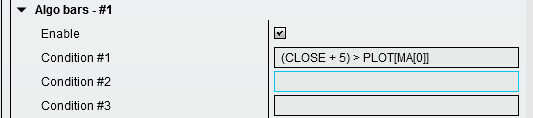
PLOT[plotname[index]] — Third-party indicator values
The PLOT[name[barsAgo]] syntax allows you to query the value of any exposed plot from any other indicator on the same chart. This is useful for comparing your profile bars data against moving averages, oscillators, or custom indicators.
Syntax: PLOT[plotname[barsAgo]]where:
- name — the exact name of a plot from an indicator on the chart (case-sensitive)
- barsAgo — how many bars back to look (0 = current bar, 1 = previous bar, etc.)
Examples:
PLOT[EMA[0]] — Value of the EMA plot on the current bar
PLOT[RSI[1]] — RSI value from one bar ago
PLOT[MACD[2]] — MACD value from two bars ago
Important notes for PLOT[]:
- The indicator must be present on the same chart as pjsProfileBars.
- You need to know the exact plot name. In NinjaTrader, plots are usually named when you add them (e.g., “EMA”, “RSI”, or custom names).
- NinjaTrader does not guarantee the order in which indicators update on a chart. If an indicator has not yet calculated its current bar value at the time pjsProfileBars evaluates conditions, it may return stale data.
Signal variables
The following variables are available on bars where signals have been detected. They return 1 if the signal condition was met, or 0 otherwise.
Imbalance Signals
HASBULLISHSWEEP — Bullish sweep detected HASBEARISHSWEEP — Bearish sweep detected HASBULLISHMULTIPLEIMBALANCE — Multiple imbalance on the bullish side HASBEARISHMULTIPLEIMBALANCE — Multiple imbalance on the bearish side HASBULLISHSTACKEDIMBALANCE — Stacked imbalance (bullish) HASBEARISHSTACKEDIMBALANCE — Stacked imbalance (bearish)
Algo Bar Signals
HASBULLISHALGOBARS — Bullish algo bar detected HASBEARISHALGOBARS — Bearish algo bar detected
Volume and Sequence Signals
HASBULLISHVOLUMESEQUENCING — Bullish volume sequencing HASBEARISHVOLUMESEQUENCING — Bearish volume sequencing
Divergence Signals
HASBULLISHDELTADIV — Bullish delta divergence HASBEARISHDELTADIV — Bearish delta divergence HASBULLISHDELTADIVATHIGHLOW — Delta divergence at bar high/low (bullish) HASBEARISHDELTADIVATHIGHLOW — Delta divergence at bar high/low (bearish)
Momentum and Trend Signals
HASBULLISHFADINGDELTAMOMENTUM — Bullish fading delta momentum HASBEARISHFADINGDELTAMOMENTUM — Bearish fading delta momentum HASBULLISHRISINGDELTAMOMENTUM — Rising delta momentum (bullish) HASBEARISHRISINGDELTAMOMENTUM — Rising delta momentum (bearish) HASBULLISHDELTACHANGE — Delta change signal (bullish) HASBEARISHDELTACHANGE — Delta change signal (bearish)
Original Buy/Sell Signals
HASBULLISHPROFILEPATTERN — Original profile pattern buy signal HASBEARISHPROFILEPATTERN — Original profile pattern sell signal
Data Analytics variables
Available only on the Data Analytics version of pjsProfileBars. These require machine learning models and Ollama to be set up.
Expected Outcome
DAEOC0 — Current expected outcome score DAEOC1 — Smoothed expected outcome score DAEOCF — Far-future expected outcome score
ML Scores
DARRLONG — ML long classification score DARRSHORT — ML short classification score
Trade Bias
DATRADEBIAS — Trade bias: 0 = neutral, positive/negative for directional lean DATRADEBIASCONFIDENCE — Confidence level of the trade bias prediction as a percentage (0 to 100)
Market Analysis
DAMARKETBIAS — Market bias from ML analysis DACLASSIFIERCUSTOMMATCH0 — Custom classifier match score
Signal Variables (DA only)
HASBULLISHHIGHPROBABILITYDA — High probability DA setup (bullish) HASBEARISHHIGHPROBABILITYDA — High probability DA setup (bearish) HASBULLISHENSDA — ENS DA signal (bullish) HASBEARISHENSDA — ENS DA signal (bearish) HASBULLISHPORTFOLIO — Bullish portfolio signal HASBEARISHPORTFOLIO — Bearish portfolio signal
Voice alert
The voice announcement you want when the criteria is met, at the close of bar.
Audio alert
The custom audio alert you want (.wav file) played when the criteria is met, at the close of bar.
Chart marker
If checked, the signal name will be printed on the chart. This option uses a native text object (so third-party indicators can also read it), so it may affect performance if you are generating thousands of them.
Chart marker brush
Custom colouring for the chart markers
Above bar?
You have the choice of placing any chart market above or below the bar
Paint bar
Will paint the body of the bar where the signal is generated.
Paint background
Will colour the background of the chart on the bar where the signal is generated.
Signal name
This is the custom signal name you give to this set of criteria.
Take trade (buy & sell)
These options will trigger trades, but only if you have the algo helper enabled and armed. The algo helper enables you to semi-automate your entries or exits based on the trigger of your criteria in the algobars conditions.
This list has been updated since it was originally written with newly supported terms from new releases.
Nice examples and advice are often shared in the Discord.